Cold Foil Not Transferring Cleanly? A Substrate & UV Adhesive Checklist
Diagnose adhesion, blank areas, stringing, edge quality and registration with a practical press-side checklist from LiangyuFoil.
When cold foil not transferring cleanly shows up on press, the foil roll is only one part of the system. Cold foil depends on the substrate surface, UV adhesive laydown, nip pressure, foil tension, lamp output, press speed, registration, and the protective varnish or overprint layer used after transfer.
Use this page when a label, flexible package, wine label, shrink sleeve, or folding carton shows blank spots, stringing, weak adhesion, dirty edges, pinholes, or poor overprint registration. Send the information in the checklist below and LiangyuFoil can help narrow the trial path before the next production run.
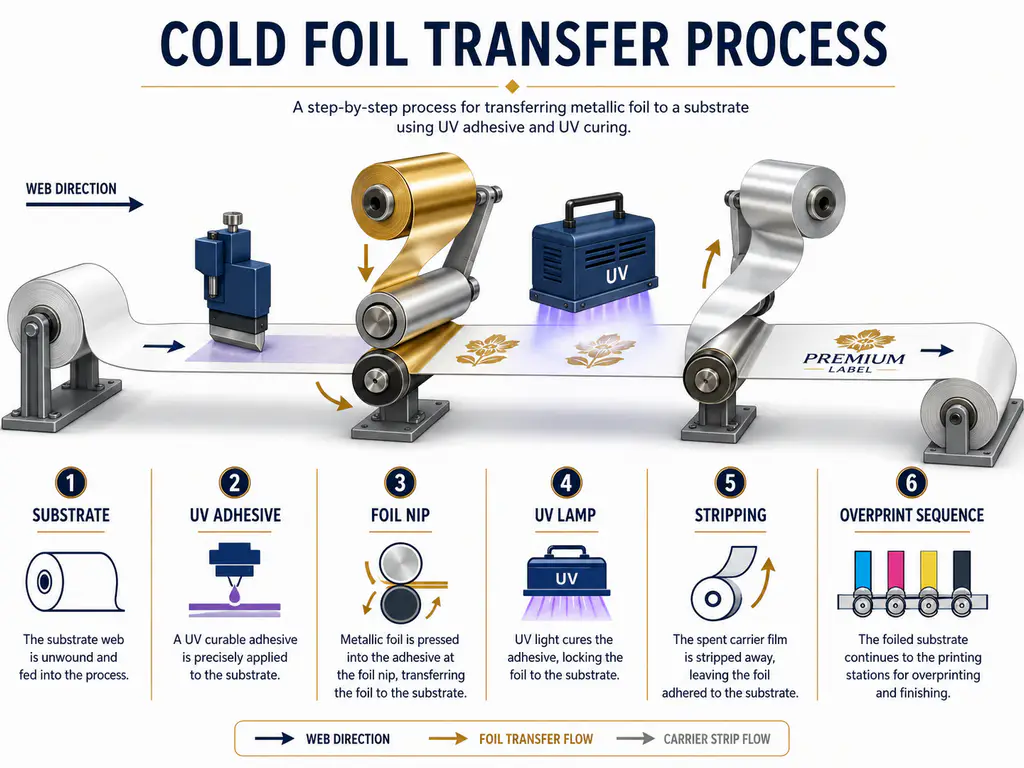
Cold foil not transferring cleanly usually means the UV adhesive is not wetting, curing, or holding the foil consistently on the chosen substrate. Check substrate surface, adhesive viscosity and laydown, nip roller condition, foil tension, UV lamp condition, press speed, and overprint sequence before replacing the foil grade.
Cold foil is an inline printing process: a UV-curable adhesive is printed where the metallic image is needed, foil is nipped onto the wet adhesive, UV energy cures the bond, and unused foil is stripped away. For a process comparison, see LiangyuFoil’s cold foil vs hot foil guide.
What Information Should You Send for Cold Foil Troubleshooting?
A good troubleshooting request should let the supplier rebuild the press condition in their head. A message that says “foil does not transfer” is too broad. The same symptom can come from a slick film, weak UV adhesive, worn nip roller, high speed, lamp aging, dust, or an artwork trap problem.
| Required field | What to provide | Why it matters |
|---|---|---|
| Substrate | Paper, coated paper, PET, PP, PE, PVC, BOPP, film laminate, or carton board | Cold foil needs a surface that lets UV adhesive wet and anchor |
| Printing press | Flexo, offset, sheetfed, narrow-web, hybrid digital, unit layout | Determines adhesive application, nip, UV position, and registration limits |
| Press speed | Current m/min or sheets/hour, plus trial speed if reduced | Speed changes adhesive laydown, UV dose, dwell, web tension, and stripping behavior |
| UV adhesive | Brand, code, viscosity, anilox/plate, coat weight, age, storage | Adhesive chemistry is the main bonding layer in cold foil transfer |
| Problem images | Macro photo, full web/sheet photo, foil carrier after stripping | Images reveal gaps, edge dirt, stringing, skipped areas, and registration drift |
| Target effect | Solid metallic area, fine line, halftone, holographic effect, overprinted color | The right foil and adhesive window depend on the visual result |
If possible, add the foil roll label, UV lamp type, lamp hours, curing power, anilox specification, nip roller hardness, foil unwind/rewind tension, and whether the foil is overprinted or varnished after transfer.
Substrate Checklist: Is the Surface Ready for Cold Foil?
Cold foil works best on smooth, stable, receptive surfaces. Wikipedia’s overview of cold foil printing notes that smooth glossy coated papers tend to give the best results, while unsuitable substrates can limit transfer quality. In production, the same rule applies to many label films and laminated packaging stocks: a surface can print ink acceptably but still reject foil adhesive.
| Substrate situation | Typical symptom | First check |
|---|---|---|
| Rough paper or porous board | Dull foil, pinholes, patchy solids | Increase adhesive uniformity or test a smoother stock |
| Low-energy film such as PP or PE | Missing transfer, weak rub resistance | Check treatment age, dyne trend, and surface contamination |
| Silicone, wax, or slip additives | Random blank spots or poor adhesion | Compare cleaned sample with untouched sample |
| Matte coating or soft-touch surface | Broken edges, weak metallic density | Test foil-receptive coating or primer |
| Film laminate on paperboard | Adhesive beads or refuses to wet | Treat as film, not as paper |
| Moisture or dust on substrate | Random voids and specks | Improve storage, cleaning, and web path control |
UV Adhesive Checklist: Is the Glue Doing the Job?
Cold foil is often described as “foil printing,” but the adhesive is the real image. If the UV adhesive is too thin, too thick, contaminated, under-cured, over-spread, poorly metered, or incompatible with the substrate, the foil will show it immediately.
INX describes cold foil as a process where an energy-curable adhesive is applied to the target area before foil transfer. Packaging Digest also highlights the importance of correct lamination pressure and roller condition during application to wet UV adhesive. In practical troubleshooting, adhesive and nip must be checked together.
| UV adhesive variable | If too low or weak | If too high or heavy |
|---|---|---|
| Viscosity | Broken transfer, empty areas, weak foil hold | Dirty edges, stringing, filling of fine detail |
| Coat weight | Pinholes, low brightness, poor rub | Raised edges, adhesive squeeze-out, tacky residue |
| UV dose | Foil lifts, smears, weak overprint | Brittle adhesive, gloss shift, poor downstream flexibility |
| Anilox volume | Starved solids, inconsistent density | Slur, dirty borders, slow curing |
| Plate condition | Missing detail or uneven adhesive | Distorted image and registration drift |
| Adhesive age/storage | Unstable cure or transfer | Unpredictable viscosity and poor repeatability |
When cold foil not transferring cleanly, do not change adhesive, speed, lamp power, and foil tension in the same trial. Change one variable, record the result, and keep the rejected foil carrier for comparison. The carrier often shows whether the adhesive image was complete before stripping.
Press Speed, UV Lamps, Nip and Foil Tension
Press speed is not only a productivity number. It changes UV exposure time, adhesive flow, foil contact, web control, and stripping behavior. If the defect improves when speed is reduced, the job likely needs more UV dose, better adhesive laydown, better nip contact, or a slower validated production window.
| Press variable | What to inspect | Clean-transfer target |
|---|---|---|
| Speed | Compare normal speed with a controlled slower trial | Transfer remains clean without reducing production beyond the approved range |
| UV lamps | Lamp age, reflector cleanliness, power setting, LED wavelength match | Adhesive cures enough to hold foil and survive overprint/varnish |
| Nip roller | Hardness, cleanliness, pressure uniformity, wear marks | Even contact across web width without crushing detail |
| Foil tension | Unwind, rewind, wrinkle control, stripping angle | Stable web, no flutter, no wrinkle marks, no edge lift |
| Web path | Dust, adhesive mist, roller build-up, static | Clean foil surface and consistent stripping |
| Registration | Adhesive image, foil unit, overprint stations | Metallic area aligns with graphics and trap allowance |
Packaging Digest recommends careful control of the lamination station and warns that unsuitable nip roller conditions can cause poor foil transfer. On older presses, also inspect UV reflectors and roller cleanliness before blaming foil grade. A small build-up of adhesive or dust can create repeatable skipped bands.
Defect Map: Match the Symptom to the First Test
Operators often describe cold foil problems in different words. Reddit and print-forum discussions commonly group the same pain points into adhesion, stringing, blank spots, dirty edges, and registration problems. The useful move is to translate the symptom into a testable press variable.
| Defect seen on press | What it usually means | First controlled test |
|---|---|---|
| Blank areas inside foil image | Adhesive starvation, substrate rejection, UV issue, low nip | Check adhesive image under light, reduce speed, inspect lamp output |
| Stringing or hairlines | Adhesive too heavy, too tacky, or too slow to release | Reduce coat weight or viscosity within supplier range |
| Dirty or fuzzy edges | Adhesive spread, wrong trap, excessive pressure, plate wear | Inspect plate/anilox and reduce squeeze-out |
| Edge not clean after stripping | Stripping angle, foil tension, adhesive cure, static | Adjust tension and stripping angle after confirming cure |
| Foil lifts after overprint | Weak adhesive cure or incompatible overprint varnish | Test cure before overprint and after final varnish |
| Poor registration | Web movement, plate distortion, trap too tight | Add trap allowance and stabilize web tension |
| Pinholes in solids | Rough substrate, dust, anilox starvation, weak nip | Clean web path, check anilox, test smoother stock |
| Metallic shade inconsistent | Uneven adhesive, UV variation, foil roll tension | Compare left-center-right transfer and carrier web |
Artwork and Target Effect Checklist
Cold foil can produce strong metallic coverage and overprinted color effects, but it is less forgiving when the artwork is designed without trap, minimum line width, or overprint planning. If the target effect is a premium wine label crest, a cosmetic label logo, a flexible package metallic block, or a holographic security accent, the trial plan should be different.
| Target effect | Design risk | Recommended note for quote request |
|---|---|---|
| Solid metallic background | Pinholes, visible bands, adhesive starvation | Send solid-area size and acceptable pinhole limit |
| Fine line or small text | Broken strokes, dirty edges | Send minimum line width and font size |
| Overprinted metallic color | Registration drift and varnish compatibility | Send overprint ink/varnish sequence |
| Holographic cold foil | Pattern direction and visual alignment | Send target effect photo and viewing angle |
| Flexible packaging | Rub, fold, lamination, heat exposure | Send downstream process and end-use test |
| Cosmetic or wine label | Premium appearance and edge cleanliness | Send brand sample, paper/film code, and finish target |
Quote Request Form: What LiangyuFoil Needs From You
Use these fields in the Elementor form for the /cold-foil-troubleshooting/ page:
| Form field | Placeholder text | Field type |
|---|---|---|
| Substrate | Example: coated paper, PET label film, BOPP, PP tube label, wine paper | Text field |
| Printing press | Example: flexo narrow-web, sheetfed offset, hybrid digital + flexo | Text field |
| Speed | Example: 80 m/min, 120 m/min, 8,000 sheets/hour | Text field |
| UV adhesive | Brand/code, viscosity, anilox volume, lamp type if known | Text field |
| Problem images | Upload macro photo, full label/web photo, and carrier foil photo | File upload |
| Target effect | Gold solid, silver fine line, holographic logo, overprinted metallic color | Text area |
Recommended button text: Get My Cold Foil Checklist Review
Confirmation message: Thanks. LiangyuFoil will review your substrate, press speed, UV adhesive, defect images, and target effect, then suggest a controlled trial path or suitable foil sample.
Machine Speed
Machine speed is a practical quote requirement because foil release and adhesion behave differently at slow, medium, and high speeds. A foil that works on a slow sample press may fail on a high-speed line.
Useful details:
- Pieces per minute for tube, cap, card, or carton stamping.
- Meters per minute for roll-fed label or film production.
- Dwell time if known.
- Whether the machine is flatbed, rotary, roll-on, clamshell, tube stamping, or narrow-web press.
- Current defect rate or waste percentage if the buyer is troubleshooting.
Order Quantity
Order quantity affects MOQ, price tier, sample plan, production scheduling, packing, and freight. A serious RFQ should separate sample quantity from mass production quantity.
Good examples:
- “Sample request: 2 rolls, production estimate: 200 rolls per month.”
- “Pilot order: 20 rolls, repeat order possible after approval.”
- “Annual usage: about 30,000 square meters.”
- “One-time project: 5,000 cosmetic boxes.”
If the buyer does not know final consumption, provide product size, foil area, and order volume. The supplier can help estimate foil usage.

Destination Country
Destination country affects freight, export documents, transit time, duty planning, and packaging method. It also helps the supplier quote realistic lead time.
Include:
- Destination country and city.
- Preferred shipping method: express, air, sea, rail, or buyer’s forwarder.
- Whether door-to-door service is needed.
- Import document requirements.
- Urgency or launch deadline.
FAQ
Why is my cold foil leaving blank spots?
Blank spots usually come from adhesive starvation, dust, rough substrate, low surface energy, weak nip contact, or insufficient UV cure. Check whether the adhesive image is complete before the foil is stripped, then compare a slower speed trial and a cleaned substrate sample.
Why are the cold foil edges dirty or fuzzy?
Dirty edges often mean the UV adhesive is spreading beyond the artwork. Common causes include excessive adhesive laydown, high viscosity, worn plate edges, too much nip pressure, poor trap design, or registration movement. Inspect the plate, anilox, adhesive image, and foil carrier.
What causes stringing in cold foil transfer?
Stringing usually points to adhesive that is too heavy, too tacky, under-cured, or slow to release during stripping. Reduce adhesive laydown within the supplier’s range, verify UV lamp output, and check the stripping angle and foil tension.
How does substrate affect cold foil transfer?
The substrate controls how the UV adhesive wets and anchors. Smooth coated papers and properly treated films usually transfer better than rough, dusty, porous, low-energy, waxy, or silicone-contaminated surfaces. Always test the actual production substrate.
Does increasing UV power always fix cold foil adhesion?
No. More UV power can help under-cure, but it cannot fix poor substrate wetting, contaminated material, wrong adhesive, worn rollers, or bad artwork trap. It may also make some systems brittle. Change one variable and test the final package condition.
What photos should I send for cold foil troubleshooting?
Send one macro close-up of the defect, one full label or web photo, one photo of the stripped foil carrier, and one photo that shows the direction of travel. If possible, include the approved sample next to the failed sample.
Should I switch from cold foil to hot foil?
Switch when the artwork needs deep tactile edges, embossing, difficult textured papers, very crisp fine detail, or a substrate that does not work well with UV adhesive. For fast inline metallic label coverage, cold foil may still be the better process after troubleshooting.
Need a cleaner cold foil transfer on your next run?
Send your substrate, press type, speed, UV adhesive details, defect photos, and target metallic effect. LiangyuFoil can help compare foil grade, adhesive window, and production settings before you waste another full roll.